 Micah's Malwr Club
How to embed videos in Trilium pages
From what I have gleaned - there are two decent ways of adding video embeds to your posts:
- Create an HTML note using the <video …> tag and link it to your post using the shareHTML relation
- OR, by using modified CSS/JS plugin to add that functionality
The shortcoming with the first method, shareHTML, is that the embeds can not be anchored in specific locations throughout the blog. For example, you cannot do something like:
paragraph … embed … paragraph … paragraph … embedYou are only able to prepend or append content to your posts with the label "#shareHtmlLocation='content:end'" - with the position dictated by ‘end’ or ‘start’. This works and it is okay if you do not want to mess with the JS/CSS behind Trilium, but it is not the most powerful option.
I use the following JS to swap any hyperlinks or <a href="…"> for a <video … > tag instead. This allows me to place videos wherever I want within a post without having to use hacky methods like a renderNote or shareHTML.
The modified JS:
document.addEventListener('DOMContentLoaded', function() {

  // ...

  const videoExtensions = /\.(mp4|webm|ogg|mov|m3u8)(\?.*)?$/i;
  const content = document.querySelector('#content') || document.body;

  content.querySelectorAll('a[href]').forEach(link => {
    const href = link.getAttribute('href');
    if (!videoExtensions.test(href)) return;

    const url = href;
    const ext = url.split('.').pop().split('?')[0].toLowerCase();
    const mimeType = ext === 'mov' ? 'video/mp4' : `video/${ext}`;

    const player = document.createElement('div');
    player.className = 'trilium-video-player';
    player.innerHTML = `
        <div class="video-container" style="padding-bottom:0;height:auto;">
            <video controls playsinline preload="metadata"
                 style="position:relative;width:100%;height:auto;aspect-ratio:16/9;border:0;display:block;">
            <source src="${url}" type="${mimeType}">
              Your browser does not support the video tag.
            </video>
        </div>
    `;

    link.replaceWith(player);

  });

  // ...

});
Then, I am able to create individual text notes like the following:
Lorem ipsum dolor sit amet, consectetur adipiscing elit. Vivamus placerat ex ac massa tincidunt, eu efficitur enim fringilla. Nulla a condimentum nibh. Quisque in auctor tortor. Nullam in scelerisque ipsum, vel pulvinar tortor. Etiam sit amet varius nisi. Cras ut tristique nibh, sit amet suscipit leo. Nulla interdum, felis sit amet interdum bibendum, nisi risus pulvinar neque, et commodo mauris dui in ante. Aenean cursus hendrerit ex non tempus. Sed pharetra augue in lorem efficitur iaculis. Fusce eget fermentum arcu, sit amet mollis libero. Nunc ipsum purus, facilisis vitae elit ut, fermentum mollis lectus.

https://v.fireshare.net/_content/video/7b19a7274b9857a64c9b36f319d507f1.mp4

Integer mauris augue, finibus quis viverra at, maximus iaculis ante. Duis ullamcorper purus odio, molestie convallis ex varius eget. Nam mollis tempus tortor vitae mollis. Etiam ac felis eget massa malesuada venenatis. Mauris ullamcorper tellus nec molestie congue. Aliquam quis mauris turpis. Nunc non maximus ex, vel tincidunt mauris. Ut feugiat leo vel ultrices eleifend. Praesent aliquet diam vitae augue luctus, sit amet sollicitudin purus molestie. Duis pretium quis augue sed commodo. Morbi justo quam, dignissim non sapien in, gravida posuere sem. Ut eu nisl vulputate arcu sodales pellentesque sed in arcu. In condimentum tristique ligula et tincidunt.

https://v.fireshare.net/_content/video/7b19a7274b9857a64c9b36f319d507f1.mp4

Nam mi orci, porttitor a nisi ac, blandit mollis nibh. Nullam eu purus odio. Nullam id dapibus lacus. Nunc non est nibh. Donec hendrerit mauris nec eros consectetur hendrerit. Etiam a rutrum dolor, ut finibus libero. Sed nisi libero, aliquet vitae hendrerit id, ornare quis mauris. Praesent molestie tellus ut massa accumsan, sed feugiat mauris vulputate. Donec ac purus ex. Quisque gravida mauris ut tincidunt mattis. Cras aliquet sit amet turpis at molestie.

https://v.fireshare.net/_content/video/7b19a7274b9857a64c9b36f319d507f1.mp4
The output or rendered result for that text then looks something like this:
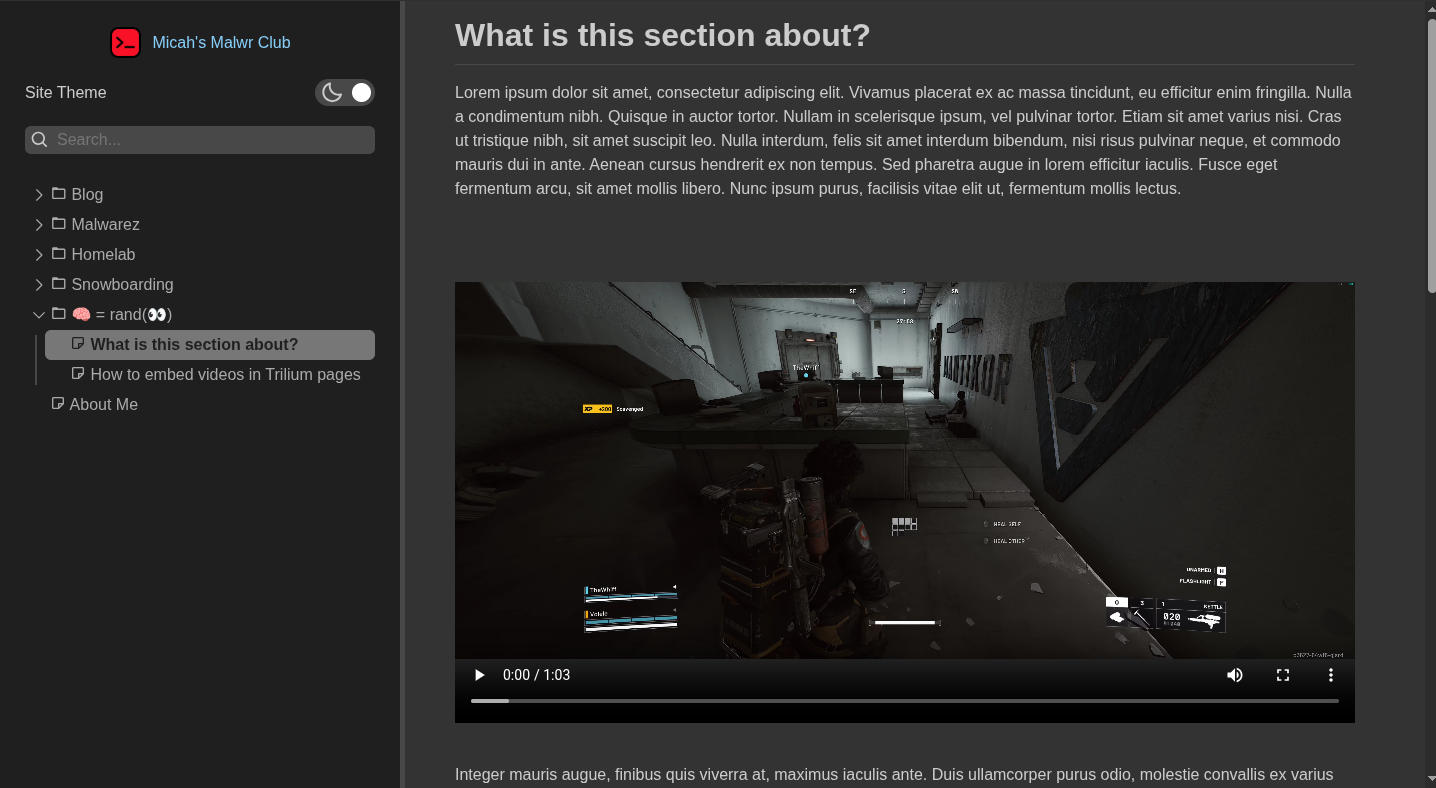
Amazing! In my opinion, this works a lot better than most of what you will see anywhere else. The current limitations with this method, that I know of, are the following:
- Limited to detecting and replacing only hrefs ending with *.mp4
- Defaults to 16:9 viewing window
It shouldn't be difficult to expand the supported hrefs, but currently I do not need it - so, that will be on pause for a minute hahaha …
The viewing window might be adjustable by modifying the linked url from …
https://v.fireshare.net/_content/video/7b19a7274b9857a64c9b36f319d507f1.mp4

to ...

https://v.fireshare.net/_content/video/7b19a7274b9857a64c9b36f319d507f1.mp4#16:9

or ...

https://v.fireshare.net/_content/video/7b19a7274b9857a64c9b36f319d507f1.mp4#4:3
But, I haven't tested this yet. It should be feasible though, but that is a task left for the reader (or my future self) ;)